    <FilesMatch "\.(css|js)$">
    Header set Cache-Control "max-age=172800, public, must-revalidate"
    </FilesMatch>
2020/04/03
Laravel 5.5 css/js cache
再.htaccess內加入下方代碼即可,Cache2天
2013/09/26
CSS Image 水平置中
剛剛把『使用Google Chart API產生QR Code』所產生的QR Code新增到網頁,QR Code圖片總是靠左邊的

只要將網頁加入以下CSS,QR Code部份就會改成水平置中了
 為什麼加了兩行就將圖片水平置中了呢?
因為display可以改變塊級元素的顯示方式,選擇block是把他當成div去用;並將margin設定為0 auto,這種設定方法常用於置中對齊
如同學『Kennedy』所說,CSS得靠經驗適時的去活用它
<!DOCTYPE HTML>
<html>
 <body>
  <img src="http://chart.apis.google.com/chart?cht=qr&chl=http://writecodepeople.blogspot.tw/&chs=480x480" id="qrcode">
 </body>
</html>

只要將網頁加入以下CSS,QR Code部份就會改成水平置中了
<style type="text/css">
   #qrcode{
    display: block;
    margin:0 auto;
   }
  </style>

因為display可以改變塊級元素的顯示方式,選擇block是把他當成div去用;並將margin設定為0 auto,這種設定方法常用於置中對齊
如同學『Kennedy』所說,CSS得靠經驗適時的去活用它
參考資料:
2013/08/28
Responsive Web Design
RWD源自於Ethan Marcotte 在他在 A List Apart 的文章中發明了術語 Responsive Web Design (RWD)。
是參考這篇文章的說法,『Responsive Web Design (RWD) 和 Adaptive Web Design (AWD)』
中文大概就是自適應,應該也沒有更好得翻譯了吧XD
RWD就是基於目前的螢幕大小尺寸不一以及行動裝置的新起,所以才演變而來的。
根據螢幕大小的解析度去調整介面,該方法也是透過CSS3的media去實現的
以下會有一個範例程式碼,會根據瀏覽器大小做相對應的配置
是參考這篇文章的說法,『Responsive Web Design (RWD) 和 Adaptive Web Design (AWD)』
中文大概就是自適應,應該也沒有更好得翻譯了吧XD
RWD就是基於目前的螢幕大小尺寸不一以及行動裝置的新起,所以才演變而來的。
根據螢幕大小的解析度去調整介面,該方法也是透過CSS3的media去實現的
以下會有一個範例程式碼,會根據瀏覽器大小做相對應的配置
2013/08/19
CSS Box Model
CSS在排版上有一個很重要的觀念就是Box Model

Box Model在我看來就是一個盒子,間隔多少(Margin),邊界設計什麼樣式(Border),內容物與邊界要間隔多少(Padding)
Margin語意是相差,與邊界相差多遠
Border語意是邊界,邊界設計可以在此設計
Padding語意填充,則是需要與中間物填充多少東西去區隔

資料參考:
http://www.1keydata.com/css-tutorial/tw/margin.php
http://www.quackit.com/css/properties/css_border-color.cfm
http://www.w3.org/TR/CSS2/box.html
http://blog.kkbruce.net/2009/10/css-margin.html#.UhHlzJIweqg
http://pinkyvivi.pixnet.net/blog/post/1131260
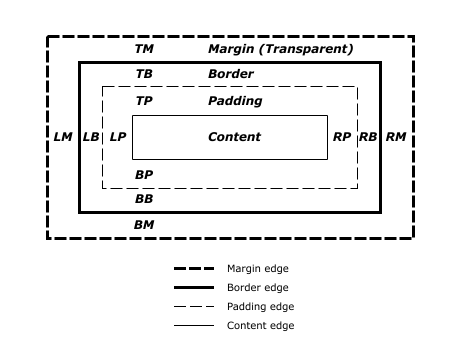
Box Model在我看來就是一個盒子,間隔多少(Margin),邊界設計什麼樣式(Border),內容物與邊界要間隔多少(Padding)
Margin語意是相差,與邊界相差多遠
Border語意是邊界,邊界設計可以在此設計
Padding語意填充,則是需要與中間物填充多少東西去區隔
<!DOCTYPE html>

<html lang="zh-tw">
    <head>
        <meta charset="utf-8" />
        <title>盒子模式</title>
    </head>
    <body>
        <style type="text/css">
            body {
                background: grey;
            }

            #div1 {
                color: gold;
                font-size: 20px;
                margin-top: 20%;
                margin-bottom: 10%;
                margin-left: 10%;
                margin-right: 10%;
                border-color: skyblue;
                border-style: solid;
                border-width: 5px;
                padding-top:20px;
                padding-bottom:100px;
    padding-left:500px;
    padding-right:0px;
            }
        </style>
        <div id="div1">
            Test
        </div>
    </body>
</html>

資料參考:
http://www.1keydata.com/css-tutorial/tw/margin.php
http://www.quackit.com/css/properties/css_border-color.cfm
http://www.w3.org/TR/CSS2/box.html
http://blog.kkbruce.net/2009/10/css-margin.html#.UhHlzJIweqg
http://pinkyvivi.pixnet.net/blog/post/1131260
2013/08/15
CSS image 縮放顯示
最近剛加入一個新創團隊,也開始展開技術上的學習
執行長表示:他不想看到個人照片是過度壓縮而造成變形
能夠讓圖片在Div彈性的縮放,而不是造成比例上的失調
可以清楚看到第一張圖與第二張圖的差異是縮放的比例差異而已

參考資料:
http://stackoverflow.com/questions/3182683/css-image-mask-overlay
http://www.cssbakery.com/2010/11/css-cookie-cutter-revisited.html
http://www.cssbakery.com/2009/06/background-image.html
執行長表示:他不想看到個人照片是過度壓縮而造成變形
能夠讓圖片在Div彈性的縮放,而不是造成比例上的失調
<!DOCTYPE html>

<html lang="zh-tw">
    <head>
        <meta charset="utf-8" />
        <title>CSS scroll Demo</title>
        <style type="text/css">

            body {
                background-color: grey;
            }

            .test1 img {
                width: 203px;
                height: 203px;
                margin-left: 43px;
                margin-bottom: 50px;
            }

            .test2 {
                background-color: transparent;
                background-image: url('http://nsysu.airstage.tw/member/images/B996060015/member/me.jpg');
                background-repeat: no-repeat;
                background-position: left top;
                background-attachment: scroll;
                background-size: 100%;
                width: 203px;
                height: 203px;
                margin-left: 0px;
                margin-left: 43px;
            }


        </style>
    </head>
    <body>
        <div class="test1"><img src="http://nsysu.airstage.tw/member/images/B996060015/member/me.jpg" width="203px"  height="203px"  ></div>
        <div class="test2"></div>
    </body>
</html>
可以清楚看到第一張圖與第二張圖的差異是縮放的比例差異而已

參考資料:
http://stackoverflow.com/questions/3182683/css-image-mask-overlay
http://www.cssbakery.com/2010/11/css-cookie-cutter-revisited.html
http://www.cssbakery.com/2009/06/background-image.html
2013/08/12
CSS選擇器
CSS是一種style sheet language,它的目的為的是HTML以及XHTML的標籤語言。CSS可以去跟網頁溝通要如何顯示畫面出來,並可以透過CSS語法令網頁變得更加美觀。
CSS選擇器則是用來選擇標籤和屬性,並套用效果
CSS選擇器則是用來選擇標籤和屬性,並套用效果
<!DOCTYPE html>

<html lang="zh-tw">
    <head>
        <meta charset="utf-8" />
        <title>CSS Demo1</title>
        <link rel="stylesheet" type="text/css"  href="./StyleSheet.css">
    </head>
    <body>
        <div class="Class">
            Class selectors(類別選擇器):在CSS以.為開頭,一張網頁上面可以有多種重複的Class名稱
        </div><br>

        <div id="ID">
            ID selectors(ID選擇器):在CSS以#為開頭,一張網頁上不能與其他的ID重複
        </div><br>

        <div id="Type">
            <b>Type selectors(種類選擇器):HTML標籤,會套用到相同的標籤上</b>
        </div>

        <div id="Groups">
            <h1>Groups of selectors(群組選擇器):用,的方式將想套用的效果一次套用到這些標籤</h1>
            <h2>Groups of selectors(群組選擇器):用,的方式將想套用的效果一次套用到這些標籤</h2>
            <h3>Groups of selectors(群組選擇器):用,的方式將想套用的效果一次套用到這些標籤</h3>
        </div>

        <div id="Descendant">
            <h1>
                <a>Descendant combinator(後代選擇器):只有在A元素裡面的B元素才會被改變</a>
            </h1>
        </div>

        <div id="Child">
            <b>Child combinator(子選擇器):利用 A > B去選擇A的兒子,並套用效果。與後代不同的是在中間插入其他元素就不是父子關係了</b>
        </div><br>

        <div title="Attribute">
           Attribute selectors(屬性選擇器):會去尋找到合適的屬性的標籤進行套用
        </div>

        <div id="Adjacent">
            <b>該層不會改變,僅套用種類選擇器的效果</b>
            <p>
               Adjacent sibling combinator(同層相鄰選擇器):因為b跟p都在同一層,所以鄰近的p會套用效果
            </p>
            <p>該層不會被改變</p>
        </div><br>

        <div id="General">
            <a>該層不會改變,僅套用種類選擇器的效果</a>
            <p>General sibling combinator(同層全體選擇器):因為a跟p都在同一層,所有的p都會套用效果</p>
            <p>該層會被改變</p>
        </div><br>

    </body>
</html>
訂閱:
文章 (Atom)