顯示具有 Java 標籤的文章。 顯示所有文章

2023/12/02

Ubuntu LTS 22.04.3透過Docker 安裝KIE Server及Workbench


#取得最新套件版本及更新相關套件
sudo apt update -y && apt upgrade -y
#安裝相依套件
sudo apt-get install apt-transport-https ca-certificates software-properties-common curl gnupg lsb-release -y
#安裝Docker
curl -fsSL https://download.docker.com/linux/ubuntu/gpg | sudo gpg --dearmor -o /usr/share/keyrings/docker-archive-keyring.gpg
#加入Docker金鑰
echo "deb [arch=$(dpkg --print-architecture) signed-by=/usr/share/keyrings/docker-archive-keyring.gpg] https://download.docker.com/linux/ubuntu $(lsb_release -cs) stable" | sudo tee /etc/apt/sources.list.d/docker.list > /dev/null
# 更新套件來源
sudo apt update
#安裝Docker
sudo apt install docker-ce docker-ce-cli containerd.io -y
#開機啟動Docker
sudo systemctl enable --now docker
#取得workbench及KIE Server
docker pull jboss/drools-workbench-showcase
docker pull jboss/kie-server-showcase

#運行workbench及KIE Server
docker run -p 8080:8080 -p 8001:8001 -d --name drools-workbench jboss/drools-workbench-showcase:latest
docker run -p 8180:8080 -d --name kie-server --link drools-workbench:kie_wb jboss/kie-server-showcase:latest


#預設帳號密碼
USER        PASSWORD    ROLE
*********************************************
admin        admin                admin,analyst,kiemgmt
krisv           krisv                  admin,analyst
john            john                  analyst,Accounting,PM
sales-rep   sales-rep           analyst,sales
katy            katy                  analyst,HR
jack            jack                   analyst,IT


訪問地址:
Workbench
http://localhost:8080/business-central/kie-wb.jsp
KIE-Server http://localhost:8180/kie-server/services/rest/server/

2023/11/09

整合 GitLab Private Repository with Jenkins and Nexus Repository

如果還不知道如何使用Webhook可以先至『GitLab 透過 Webhook 連動 Jenkins』查看
目標:代碼提交時,透過Jenkins自動處理上傳的代碼並發布到Maven Repository
 記得要先在Maven Project的pom.xml加入<distributionManagement>和maven-compiler-plugin,下方是示範的pom.xml


2019/09/23

JSP 小數點第一位

討厭Java的我永遠都找到寫Java的工作XDDDD
maxFractionDigits:小數第幾位

<%@ taglib prefix="fmt" uri="http://java.sun.com/jsp/jstl/fmt" %>
<input type="range" name="test" value='<fmt:formatNumber type="number" value="${test/ 10}" maxFractionDigits="1" var="num"/>'>


參考資料:
https://docs.oracle.com/javaee/5/jstl/1.1/docs/tlddocs/fmt/tld-summary.html

2019/09/10

Java JDK8 Lambda

新公司主要用Java,雖然認識我的都知道我非常不太喜歡寫Java
不過既來之則安之吧
JDK7時就有聽過一些Java大師說到Java終於要出Lambda式寫法
在那之前我大概都是透過C#.Net的LINQ和Haskell去學習Lambda寫法
雖然相比之下,C#.Net LINQ還是剽悍許多,Haskell更加狂
或許這是Java算是有誠意的更新吧?XDDD

testProject;

import java.util.ArrayList;
import java.util.stream.Collectors;
import java.util.stream.IntStream;

public class Test {

 public static void main(String[] args) {
  // 產生0-50 to ArrayList
  ArrayList<Integer> list = IntStream.range(0, 51).collect(ArrayList<Integer>::new, ArrayList::add,
    ArrayList::addAll);
  System.out.println("產生0-50數字");
  // 走訪n
  list.forEach(System.out::println);
  // Filter n is odd
  System.out.println("取奇數");
  list.stream().filter(n -> n % 2 != 0).collect(Collectors.toList()).forEach(System.out::print);
  // Filter n is even
  System.out.println("取偶數");
  list.stream().filter(n -> n % 2 == 0).collect(Collectors.toList()).forEach(System.out::println);
  // get summary statistics
  System.out.println("取得個數, 最小值, 最大值, 總和以及平均數\n" + list.stream().mapToInt(x -> x).summaryStatistics());
  // get the array sum
  System.out.println("取得總和\n" + list.stream().mapToInt(x -> x).summaryStatistics().getSum());
 }

}


執行結果:

Install Jenkins on CentOS 7

好久沒寫文章,最近都在國外工作
順應主管與同事最近研究Jenkins就順便補一下之前安裝與研究過的心得吧
Jenkins是由Java所撰寫出來的CI(Continuous Integration)工具,前身為Hudson
大學時常聽到學長說他們有用這種工具,後來出社會才小有研究,不過上次碰Jenkins是好多年前的事情了XDDDD


首先需要先安裝JDK在CentOS內
yum install -y java-1.8.0-openjdk-devel wget

加入Jenkins的repo和金鑰
wget -O /etc/yum.repos.d/jenkins.repo https://pkg.jenkins.io/redhat-stable/jenkins.repo
rpm --import https://pkg.jenkins.io/redhat-stable/jenkins.io.key

更新一下並安裝Jenkins
yum update -y
yum install -y jenkins

安裝後讓Jenkins啟動並讓之後開機都會隨著服務啟動
systemctl enable jenkins
systemctl start jenkins

最後加入防火牆規則
firewall-cmd --add-port=8080/tcp --permanent
firewall-cmd --reload

網址列輸入
http://IP:8080

就可以看到剛初始化好的Jenkins

2019/05/20

使用XJC將XML Schema輸出成POJO

上次發了一篇JAXB POJO to XML / XML to POJO,那篇忘記寫下有工具可以幫助我們快速產生POJO
所以就開一篇來寫啦XD
JDK的Bin資料夾內有個叫做XJC的工具,它可以將XML Schema輸出成POJO
我們這邊資料用「XML Schema Tutorial

<?xml version="1.0"?>
<xs:schema xmlns:xs="http://www.w3.org/2001/XMLSchema">
  <xs:element name="note">
    <xs:complexType>
      <xs:sequence>
        <xs:element name="to" type="xs:string"/>
        <xs:element name="from" type="xs:string"/>
        <xs:element name="heading" type="xs:string"/>
        <xs:element name="body" type="xs:string"/>
      </xs:sequence>
    </xs:complexType>
  </xs:element>
</xs:schema>

輸入下方指令就會產生出POJO程式碼

xjc.exe path.xsd


2019/05/15

JAXB POJO to XML / XML to POJO

JAXB(Java Architecture for XML Binding)是讓JAVA將Java Object to XML / XML to Java Object


Main.java:

import javax.xml.bind.JAXBContext;
import javax.xml.bind.JAXBException;
import javax.xml.bind.Marshaller;
import javax.xml.bind.Unmarshaller;
import java.io.File;

public class Main {
    private final static File FILE = getFILE() ;

    private static File getFILE() {
        final String PATH = String.format("%stest.xml", Main.class.getClassLoader().getResource("").getPath());
        final File FILE = new File(PATH);
        return FILE;
    }

    public static void main(String[] args) {
        //write
        classToXML();
        //read
        xmlToClass();
    }

    private static void classToXML() {
        Transcript transcript = new Transcript()
                .addStudentTolist(new Student("王曉明", new Ch(99), new En(50), new Math(100)))
                .addStudentTolist(new Student("你好嗎", new Ch(69), new En(90), new Math(10)));

        try {
            JAXBContext context = JAXBContext.newInstance(new Class[]{Transcript.class, Ch.class, En.class, Math.class, Transcript.class});
            Marshaller marshaller = context.createMarshaller();
            marshaller.setProperty(Marshaller.JAXB_ENCODING, "UTF-8");
            marshaller.setProperty(Marshaller.JAXB_FORMATTED_OUTPUT, false);
            marshaller.marshal(transcript, FILE);
            System.out.println("Output test.xml done");
        } catch (JAXBException e) {
            e.printStackTrace();
        }
    }

    private static void xmlToClass() {
        Transcript transcript = null;
        try {
            JAXBContext context = JAXBContext.newInstance(new Class[]{Transcript.class, Ch.class, En.class, Math.class, Transcript.class});
            Unmarshaller unmarshaller = context.createUnmarshaller();
            transcript = (Transcript) unmarshaller.unmarshal(FILE);
            for (Student student : transcript.getList()) {
                System.out.printf("name:%s ch:%d en:%d math:%d\n",
                        student.getName(),
                        student.getCh().getScore(),
                        student.getEn().getScore(),
                        student.getMath().getScore());
            }
        } catch (JAXBException e) {
            e.printStackTrace();
        }
    }
}


2019/04/27

Java Logback

Logback是由Log4j作者所另外再寫的log套件
需要的套件如下:

<dependency>
    <groupId>org.slf4j</groupId>
    <artifactId>slf4j-api</artifactId>
    <version>1.7.22</version>
</dependency>
<dependency>
    <groupId>ch.qos.logback</groupId>
    <artifactId>logback-core</artifactId>
    <version>1.1.7</version>
</dependency>
<dependency>
    <groupId>ch.qos.logback</groupId>
    <artifactId>logback-classic</artifactId>
    <version>1.1.7</version>
</dependency>


2019/04/26

Java 1.6 Array to list / List to Set / Set to Map

程式碼:
import java.util.*;

public class Test {

    private String[] listToArray(List<String> list) {
        return list.toArray(new String[list.size()]);
    }

    private List<String> arrayToList(String[] array) {
        return Arrays.asList(array);
    }

    private Set<String> listToSet(List<String> list) {
        return new HashSet<String>(list);
    }

    private List<String> setToList(Set<String> set) {
        return new ArrayList<String>(set);
    }

    private Set<String> mapToSet(Map<String, String> map) {
        return new HashSet<String>(map.values());
    }

    private Map<String, String> setToMap(Set<String> set) {
        Map<String, String> map = new HashMap<String, String>();
        map.put(set.iterator().next(), set.iterator().next());
        return map;
    }

    private List<String> mapToList(Map<String, String> map) {
        return new ArrayList<String>(map.values());
    }

    private Map<String, String> listToMap(List<String> list) {
        Map<String, String> map = new HashMap<String, String>();
        map.put(list.iterator().next(), list.iterator().next());
        return map;
    }

}

2019/04/16

Java JDOM2 Read / Write

XML如下:
<?xml version="1.0" encoding="UTF-8"?>
<list>
 <Student><name>王小明</name><en>50</en><ch>90</ch><math>80</math></Student>
<Student><name>陳小東</name><en>67</en><ch>70</ch><math>90</math></Student></list>


2019/03/29

Java POI 讀取整個Sheet以及寫入值至cell和取得公式計算後結果


用到的jar有以下幾個
poi-3.17.jar
poi-ooxml-3.17.jar
poi-ooxml-schemas-3.17.jar
commons-collections4-4.1.jar
xmlbeans-2.6.0.jar

import org.apache.poi.hssf.usermodel.HSSFWorkbook;
import org.apache.poi.xssf.usermodel.XSSFWorkbook;
import org.apache.poi.ss.usermodel.*;
import org.apache.poi.ss.util.CellReference;

import java.io.FileInputStream;
import java.io.IOException;
import java.util.Calendar;
import java.util.Date;
import java.util.Iterator;

/**
 * @see <a href="https://poi.apache.org/components/spreadsheet/index.html">POI-HSSF and POI-XSSF/SXSSF - Java API To Access Microsoft Excel Format Files</a>
 */
public class Excel {
    private boolean isExcel2003 = false;
    private Workbook workbook;
    private Sheet sheet;


    public Excel() throws IOException {
        this(Excel.class.getResource("test.xlsx").getPath());
    }

    public Excel(String path) throws IOException {
        this.isExcel2003 = (path.matches("^.+\\.(?i)(xls)$")) ? true : false;

        FileInputStream fileInputStream = new FileInputStream(path);
        if (this.isExcel2003) {
            this.workbook = new HSSFWorkbook(fileInputStream);
        } else {
            //2007
            this.workbook = new XSSFWorkbook(fileInputStream);
        }
        this.selectSheet(0);
    }

    public Sheet selectSheet(int index) {
        if (index < 0 || index > (this.getSheetsCount() - 1)) return null;
        this.sheet = this.workbook.getSheetAt(index);
        return this.sheet;
    }

    public int getSheetsCount() {
        return this.workbook.getNumberOfSheets();
    }

    public void readAllCell(int index) {
        this.selectSheet(index);

        Iterator<Row> rowIterator = this.sheet.rowIterator();
        while (rowIterator.hasNext()) {

            Row row = rowIterator.next();
            Iterator<Cell> cellIterator = row.cellIterator();
            while (cellIterator.hasNext()) {

                Cell cell = cellIterator.next();
                switch (cell.getCellTypeEnum()) {
                    case FORMULA:
                        System.out.println(cell.getCellFormula());
                        break;
                    case STRING:
                        System.out.println(cell.getStringCellValue());
                        break;
                    case NUMERIC:
                        System.out.println(cell.getNumericCellValue());
                        break;
                    case BOOLEAN:
                        System.out.println(cell.getBooleanCellValue());
                        break;
                    default:
                        break;
                }
            }
        }
    }

    public Object getCalculateRule(CellReference reference) {
        FormulaEvaluator evaluator = this.workbook.getCreationHelper().createFormulaEvaluator();
        Row row = this.sheet.getRow(reference.getRow());
        Cell cell = row.getCell(reference.getCol());
        CellValue value = evaluator.evaluate(cell);

        switch (value.getCellTypeEnum()) {
            case STRING:
                return value.getStringValue();
            case NUMERIC:
                return value.getNumberValue();
            case BOOLEAN:
                return value.getBooleanValue();
            default:
                return null;
        }
    }

    public void setValue(CellReference reference, Object v) {
        Row row = this.sheet.getRow(reference.getRow());
        if (row == null)
            row = sheet.createRow(reference.getRow());
        Cell cell = row.getCell(reference.getCol());
        if (v instanceof String)
            cell.setCellValue((String) v);
        else if (v instanceof Double)
            cell.setCellValue((Double) v);
        else if (v instanceof Boolean)
            cell.setCellValue((Boolean) v);
        else if (v instanceof Date)
            cell.setCellValue((Date) v);
        else if (v instanceof Calendar)
            cell.setCellValue((Calendar) v);
        else if (v instanceof RichTextString)
            cell.setCellValue((RichTextString) v);
    }

}

Java 讀寫YAML

要自定義格式要另外新增class而不要將class置於某個class內

SnakeYAML Maven:
<dependency>
 <groupId>org.yaml</groupId>
 <artifactId>snakeyaml</artifactId>
 <version>1.21</version>
</dependency>

User.class:
/**User*/
public class User{

    /**name*/
    private String name;
    /**age*/
    private int age;

    /**
     * @param name Name
     */
    public void setName(String name){this.name=name;}
    /**
     * @return name
     */
    public String getName(){return this.name;}
    /**
     * @param age Age
     */
    public void setAge(int age){this.age=age;}
    /**
     * @return age
     */
    public int getAge(){return this.age;}
    
}

user.yaml:
{age: 20, name: cyfang}


2019/03/28

Redis Cluster 3.0.2 on CentOS 7

這篇其實寫完很久,但一直忘記按發佈XD

Redis Cluster是Redis用於解決分散式的方案,又稱為Redis叢集
是一個讓數據再多個Node之間相互傳輸的服務,Redis Cluster的優勢主要有以下兩個點

  1. 自動分割數據到不同Node
  2. 部分Node當機或不可用情況能夠繼續維持服務


不過Redis Cluster並不支持處理多個keys的命令,在不同Node移動數據並不像Redis那樣高性能,高負載時有可能會遇到不可預期錯誤
Redis Cluster並非採用Consistent Hashing而是用Hash Slots,它其實就是代表一個Keys的集合
Redis Cluster共有16384 Hash Slots,將Key做CRC16校驗接著Mod 16384決定Key會放置於哪個Slot,Redis Cluster每個Node負責一部分的Hash Slots。例如,目前Cluster中有三個Master Node,則:

  • Node A包含0到3000 Hash Slots
  • Node B包含3001到9000 Hash Slots
  • Node C包含9001到16383 Hash Slots

如果新增了Node D,僅需將原本Node上的Hash Slots添加至Node D上;相對的要刪除一個Node A,將Node A上的Hash Slots遷移至Node B / C / D上,再將沒有任何Hash Slots的Node A移除即可;且新增、刪除或搬遷Hash Slots時無須停止任何服務。

Redis Cluster為了使部分Node失敗或大部分的Node無法通訊時仍可以使用,Redis Cluster使用Master-Slave複製模型,則每個Master Node則最少有會1個Slave Node;以上述的例子而言,如果沒有使用該模型的情況下,Node A失效則會導致Cluster因0到3000的Hash Slots不可用而失效。
最後Redis Cluster並不保證數據的一致性,這也意味著Redis Cluster在特定條件下有可能會丟失數據。


讓我們開始來建置Redis Cluster吧

接著我們開始來建立Redis Cluster吧,根據官方文獻建置一個Redis Cluster最少需要三個Master,也意味著還需要三個Slave來確保每個Master失效時才能將角色轉移至Slave上。
所以需先準備6台Host或container,系統為CentOS 7 minimal


Name

IP

Port

Cluster BUS Port

Master 1

192.168.126.135

6379

16379

Master 2

192.168.126.136

6380

16380

Master 3

192.168.126.141

6381

16381

Slave 1

192.168.126.142

6382

6382

Slave 2

192.168.126.143

6383

6383

Slave 3

192.168.126.144

6384

6384

Java 下載檔案並開啟檔案

今天有前輩再問應該如何用steam下載檔案,下載後將其開啟
隨便找篇ppt來當下載的來源
如果你是該作者覺得這樣很不妥歡迎跟我聯繫xd


import javax.net.ssl.HttpsURLConnection;
import javax.net.ssl.SSLContext;
import javax.net.ssl.TrustManager;
import javax.net.ssl.X509TrustManager;
import java.io.File;
import java.io.FileOutputStream;
import java.io.IOException;
import java.net.URL;
import java.nio.channels.Channels;
import java.nio.channels.ReadableByteChannel;
import java.security.KeyManagementException;
import java.security.NoSuchAlgorithmException;
import java.security.SecureRandom;
import java.security.cert.X509Certificate;

public class Test {
    public static void main(String []args) throws InterruptedException, NoSuchAlgorithmException, IOException, KeyManagementException {
        downloadFile("https://c.nknu.edu.tw/affair/UploadFile/Files/Files/envedu_1117163234.ppt");
    }

    private final static String CMD = "rundll32 url.dll,FileProtocolHandler %s";

    public static void openFile(String path) throws IOException, InterruptedException {
        if (new File(path).exists() == false) throw new IOException("No File");
        Process process = Runtime.getRuntime().exec(String.format(CMD, path));
        process.waitFor();
    }

    private final static String DOWNLOAD_FOLDER = "C:/Users/C.Y.Fang/Downloads/%s";

    public static void downloadFile(String url) throws IOException, NoSuchAlgorithmException, InterruptedException,  KeyManagementException {
        String[] array = url.split("/");
        String fileName = array[array.length - 1];
        array = null;
        System.out.println(fileName);
        boolean isHttps = url.toUpperCase().contains("HTTPS") ? true : false;


        if (isHttps) {
            SSLContext sslContext = SSLContext.getInstance("SSL");
            sslContext.init(null, trustAllCerts, new SecureRandom());
            HttpsURLConnection.setDefaultSSLSocketFactory(sslContext.getSocketFactory());
        }

        URL u = new URL(url);
        ReadableByteChannel readableByteChannel = Channels.newChannel(u.openStream());
        String path = String.format(DOWNLOAD_FOLDER, fileName);
        FileOutputStream fileOutputStream = new FileOutputStream(path);
        fileOutputStream.getChannel().transferFrom(readableByteChannel, 0, Long.MAX_VALUE);
        fileOutputStream.flush();
        fileOutputStream.close();
        fileOutputStream = null;
        readableByteChannel.close();
        readableByteChannel = null;
        openFile(path);
    }

    static TrustManager[] trustAllCerts = new TrustManager[]{
            new X509TrustManager() {
                public X509Certificate[] getAcceptedIssuers() {
                    return null;
                }

                public void checkClientTrusted(X509Certificate[] certs, String authType) {
                }

                public void checkServerTrusted(X509Certificate[] certs, String authType) {
                }
            }
    };
}


執行結果:


參考資料:
https://docs.microsoft.com/zh-tw/windows/desktop/api/shellapi/nf-shellapi-shellexecutea
https://confluence.atlassian.com/stashkb/could-not-generate-dh-keypair-on-ssl-715129360.html

2019/03/18

Java Read properties

專案結構


Score.properties:

name=TuWa
math=80
chine=75
en=69

Code:

import java.io.*;
import java.util.Properties;

public class Test {

    private static Properties properties = new Properties();

    static {
        final InputStream inputStream = Redis.class.getClassLoader().getResourceAsStream("Config.properties");
        try {
            properties.load(inputStream);
        } catch (IOException e) {
            e.printStackTrace();
        }
    }

    public static void main(String[] args) {
        final String NAME = properties.getProperty("name", "王大狗");
        final int MATH = Integer.parseInt(properties.getProperty("math", "0"));
        final int CHINE = Integer.parseInt(properties.getProperty("chine", "0"));
        final int EN = Integer.parseInt(properties.getProperty("en", "0"));
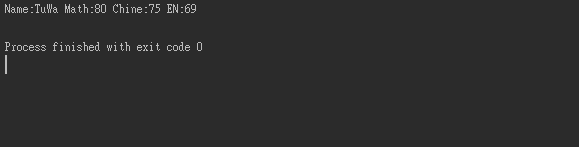
        System.out.printf("Name:%s Math:%d Chine:%d EN:%d\n", NAME, MATH, CHINE, EN);
    }
}

執行結果:

2019/03/14

Install Java JRE and JDK


# Install JAVA JRE and JDK
yum install -y java-1.8.0-openjdk java-1.8.0-openjdk-devel
# JRE path
/usr/bin/java
# JDK path
/usr/bin/javac

2019/03/12

IDEA JUnit 4 重複測試

前幾天在辦公室想如果測試只能一次一次跑
如果要測好多遍不就按到死,就上網找了一些方法
邊找邊想到說我用的是IDEA,那說不定改Run的設定參數就好了
結果還真的讓我看到XDDD


#測試一次
Once

#測試N次
N Times

#測試到有錯誤為止
Until Failure

#測試到按下停止鍵
Until Failure


執行結果:

2019/03/09

Java 用Lambda來寫費氏數列

以前寫這個要透過遞迴
現在可以輕鬆寫了XD


import java.util.stream.Stream;

public class Test {
    public static void main(String []args){
        System.out.println(Fibonacci(10));
        System.out.println(Old_Fibonacci(10));
    }


    private static long Fibonacci(int n) {
        return Stream.iterate(new long[]{1, 1}, f -> new long[]{f[1], f[0] + f[1]})
                .limit(n)
                .reduce((in, out) -> out)
                .get()[0];
    }

    private static long Old_Fibonacci(int n) {
        if (n < 2)
            return n;
        else
            return Old_Fibonacci(n - 2) + Old_Fibonacci(n - 1);
    }
}


2019/03/06

Java XML to JSON

要取得XML Tag / Content / 和 Attribute是不難
但有套件當然用套件解決了XDD
套件為org.json
我是透過Mavem安裝org.json的

<?xml version="1.0" encoding="UTF-8"?>
<project xmlns="http://maven.apache.org/POM/4.0.0"
         xmlns:xsi="http://www.w3.org/2001/XMLSchema-instance"
         xsi:schemaLocation="http://maven.apache.org/POM/4.0.0 http://maven.apache.org/xsd/maven-4.0.0.xsd">
    <modelVersion>4.0.0</modelVersion>

    <groupId>cy.com</groupId>
    <artifactId>Test</artifactId>
    <version>1.0-SNAPSHOT</version>
    <build>
        <plugins>
            <plugin>
                <groupId>org.apache.maven.plugins</groupId>
                <artifactId>maven-compiler-plugin</artifactId>
                <configuration>
                    <source>8</source>
                    <target>8</target>
                </configuration>
            </plugin>
        </plugins>
    </build>
    <dependencies>
        <dependency>
            <groupId>org.json</groupId>
            <artifactId>json</artifactId>
            <version>LATEST</version>
        </dependency>
    </dependencies>
</project>


XML參考自w3cSchools


<breakfast_menu>
    <food>
        <name>Belgian Waffles</name>
        <price>$5.95</price>
        <description>
            Two of our famous Belgian Waffles with plenty of real maple syrup
        </description>
        <calories>650</calories>
    </food>
    <food>
        <name>Strawberry Belgian Waffles</name>
        <price>$7.95</price>
        <description>
            Light Belgian waffles covered with strawberries and whipped cream
        </description>
        <calories>900</calories>
    </food>
    <food>
        <name>Berry-Berry Belgian Waffles</name>
        <price>$8.95</price>
        <description>
            Belgian waffles covered with assorted fresh berries and whipped cream
        </description>
        <calories>900</calories>
    </food>
    <food>
        <name>French Toast</name>
        <price>$4.50</price>
        <description>
            Thick slices made from our homemade sourdough bread
        </description>
        <calories>600</calories>
    </food>
    <food>
        <name>Homestyle Breakfast</name>
        <price>$6.95</price>
        <description>
            Two eggs, bacon or sausage, toast, and our ever-popular hash browns
        </description>
        <calories>950</calories>
    </food>
</breakfast_menu>